

Need 2 laptops – one to remote in to NLX PC and one to remote in to closed loop laptop
One week before #
Contact Dr. Eliashiv with potential dates for the sleep study to confirm availability for observation of stimulation.
Following implant #
Review electrode localizations, select 2 possible stimulation electrodes in PFC white matter.
- Inform neurology when selection made
- Measure electrode impedance
- >1 kOhm is preferable
- Record channels and impedances on ‘Movie 24 Sleep Experiment’ logging sheet (see here for PDF)
On the day #
Morning #
- Confirm with participant in the morning that sleep study is planned for the evening, remind them that it has AM component, and that we really need all parts
- Ask participant to not ingest caffeine after 3pm
- Ask participant to not nap (or if they need to nap please do so before lunch)
- Ask participant when they like to eat dinner
- Tell clinical team about experiment
- ask for no interruptions in the night (move antibiotics earlier, no bloods until 7:30 am) [ADI TO EDIT]
- explain that there will be some extra equipment in the room but we will move it once we have completed our morning testing
- Schedule a time in afternoon to do presleep behavior
- Re-measure electrode impedance
- 1-2 kOhm is preferable, up to 4kOhm ok
- Neurologist to validate stimulation site and impedance
Afternoon #
- Do pre-sleep behaviour
- if not already in stim-ready configuration, set up system such that only BR cart needs to be added to system
- behavioral tasks are run as outlined in Movie Paradigm Protocol
- fill in ‘Movie 24 Sleep Experiment’ logging sheet (see here for PDF)
- Upload data (neural and matlab outputs) immediately
- Neural to LTS
- Matlab logs to hoffman or box (or can be emailed if necessary)
- Inform ECE that recording has finished
- Soraya or Abdullah will pre-process the neural and TTL data and upload to box for ECE (steps are outlined below)
- ECE will train model and upload weights to box
- Abdullah will integrate trained model into closed loop system
Evening #
- If possible record drug regime currently being administered (obtain info from chart/clinical team; will be recorded on sleep questionnaire)
- Set up closed loop hardware (Closed Loop Stimulation Set Up)
- But still don’t connect the blue ribbon stim cables to BR macro stim box
- Make sure way to equipment is clear
- Make sure curtain is shut
- Setup up closed loop computer (Check section below)
- Give participant time to get ready for bed, use restroom
- Do evening sleep questionnaires (see here for PDF)
- Set up for polysom for sleep recording (Movie Paradigm Protocol- sleep)
- Go to telemetry room, wait for pt to fall asleep
- Check stim channel impedance
- Get neurologist for observation
- Observe signals for signs of NREM sleep
- based on visual observation of slow waves and sleep spindles in iEEG signal
- After ~15 mins of clear, uninterrupted NREM sleep, and neurologist is observing signal, enter patient’s room to start stim paradigm
- Plug in blue ribbon stim cable to BR macro stim box
- Return to telemetry room
- Remote in to stim laptop
- Perform test stimulations with neurologist observation
- test stim range 0.5-2.0 mA (start low, increase in increments of 0.5 mA)
- looking for level with no after discharges
- Perform test stimulations with neurologist observation
- After approval from neurologist start closed loop paradigm (see details below)
- After stimulation is complete return to room
- disconnect blue ribbon stim cable from BR stim box
- turn of BR macrostim box
- leave NLX recording running for full night of sleep
Remoting into the Closed-Loop laptop #
- Download the RustDesk client and follow installation steps to set it up on the computer you wish to use to remotely control the Closed-Loop laptop (the ‘Client computer’)
- On the Closed-loop laptop, go to the desktop and click on the “GetRustDeskServerInfo” shortcut. A terminal information message should open up.
- On the client computer, open the RustDesk client dashboard and then to “Settings”->“Network” and copy the network setting fields displayed on the Closed-loop laptop (ID server, Relay Server, and Key).
- After the network configurations are saved, use the provided ID and Password displayed on the Closed-loop laptop to connect to it.
Closed-Loop Computer Setup #
Preparing AA99 for the Transformer Closed Loop #
When the data preprocessing/model training is finished (see sections below), it is time to set up the Transformer Closed Loop. To do so:
- Download the model weights file from box:
- Currently in the directory format: Vwani_Movie/Trained Models/{pt number}/{pt number}_clusterless_multi-vit_Full/train/model_weights_epoch49.tar
- Download the clusterless threshold csv file from box:
- Currently in the directory format: Vwani_Movie/Trained Models/{pt number}/{pt_number}_Experiment{movie_watch_exp}_MovieParadigm_CAR_thresholds.csv
- For example, for 589 you would download the following files:
- Vwani_Movie/Trained Models/589/589_clusterless_multi-vit_Full/train/model_weights_epoch49.tar
- Vwani_Movie/Trained Models/589/589_Experiment6_MovieParadigm_CAR_thresholds.csv
- On the Closed-loop laptop, go to the desktop and click on the “Transformer_Model_Code_Dir” shortcut. A folder should open up.
- Copy the downloaded weights file to the “weights” subfolder in the model code dir and and rename it to model_{pt_number}_weights_epoch50.tar
- e.g. Downloads/model_weights_epoch49.tar -> transformer_model_code_dir/weights/model_589_weights_epoch50.tar
- Copy the downloaded clusterless csv file to the model code dir and rename it to {pt_number}_channel_thresholds.csv
- e.g. Downloads/589_Experiment6_MovieParadigm_CAR_thresholds.csv -> transformer_model_code_dir/589_channel_thresholds.csv
- Copy the downloaded weights file to the “weights” subfolder in the model code dir and and rename it to model_{pt_number}_weights_epoch50.tar
- On the Closed-loop laptop, go to the desktop and click on the “AA99_Configs” folder. A folder view should open up.
- Double click on the “Tranformer_Configs” shortcut in that view and then the “transformercl_config.json” file to open it up in Sublime
- In “patient_settings”, set “patient_number” and “number_bundles” to their appropriate values for the experiment.
- In “Cerestim_settings”, set “cathode_electrode” and “anode_electrode” to the corresponding BlackRock electrode output channel numbers (Clinical Montage Macro Numbers [1-Indexed]) for the electrodes you wish to stimulate in the experiment.
- Save the JSON file and close it.
- On the Closed-loop laptop, go to the desktop and click on the “RunAA99Paradigm” shortcut. A terminal window should open up.
- Activate the closedloop environment by typing conda activate closedloop and pressing enter.
- Type python addorder_tocsv.py and press enter. Then type the patient number.
- You should see a line saying something like “Created file: …/new_{pt_number}_channel_thresholds.csv”
Hardware Connections for Closed Loop #
This section assumes you have already finished the general macrostimulation hardware outlined here.
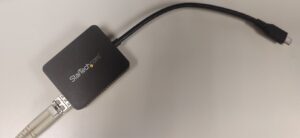
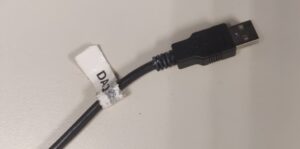
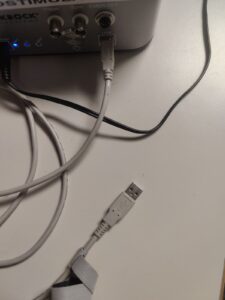
Before running any AA99/Test programs, ensure that the closed-loop laptop has the following cables connected:
- NLX fiber data cable connected via the Fiber to USB-C adapter
- DAQ TTL USB-A cable
- CereStim Macrostimulator USB-B to USB-A Cable (printer cable)
Testing Data/Stims/TTLs #
Note: When running the initial tests (before the neurologist is called), make sure the blue ribbon is not connected to the CereStim so that we aren’t sending actual stimulations. Ensure that the CereStim is powered on, and on the NLX Cart, start acquisition in Pegasus.
- On the Closed-loop laptop, go to the desktop and click on the “TestHardware” shortcut. A terminal window should open up.
- To test the data socket connection, type python nlx_socket_read.py and press enter
- If you start seeing a rapid printout of data packets, the data connection is working.
- If a bind error occurs or no output shows on the screen besides a waiting message, either the socket is not properly connected, or data is not flowing through it.
- Press Ctrl+C to exit the program
- If you start seeing a rapid printout of data packets, the data connection is working.
- To test the stims/TTLs, type ./TestStimAndTTLs and press enter
- If the program loads without errors, type stim and press enter to send a test stim.
- On the CereStim, ensure the “status” led lights up every time a stim request is sent
- On Pegasus, ensure a TTL is recorded every time a stim request is sent
- type end to exit the program
- If the program loads without errors, type stim and press enter to send a test stim.
Note: to test stimulations when the neurologist is present:
- Connect blue ribbons to back of CereStim device
- On the Closed-loop laptop, go to the desktop and click on the “AA99_Configs” folder. A folder view should open up.
- Double click on the “TestHardware_Configs” shortcut in that view and then on the “testhardware_config.json” file to open it up in Sublime
- Set “cathode_electrode” and “anode_electrode” to the corresponding BlackRock electrode output channel numbers for the electrodes you wish to stimulate in the experiment.
- Save the JSON file and close it.
- On the Closed-loop laptop, go to the desktop and click on the “TestHardware” shortcut. A terminal window should open up.
- Type ./TestStimAndTTLs and press enter
- The initial stimulation should only be 0.5 mA. When the neurologist advises it, send the stimulation request by typing stim and pressing enter
- To increase the stimulation current by 0.5 mA, type upboth and press enter. This will set the new current to +0.5 mA the previous one. To decrease the current by 0.5 mA, type downboth and press enter
- To send a new stimulation request with these new parameters, type stim and press enter
- Type end to exit the program
Running AA99 with the Transformer Closed Loop #
Once you have tested all the hardware connections and have run the setup steps above, you should be ready to run
- If you still have the terminal window open after running addorder_tocsv.py you can use it. Otherwise, on the Closed-loop laptop, go to the desktop and click on the “RunAA99Paradigm” shortcut. A terminal window should open up.
- Make sure the closedloop environment is activated by typing conda activate closedloop and pressing enter
- Type ./transformer_closedloop and press enter
- AA99 should now begin model initialization and then start running the paradigm.
Ending an AA99 Transformer Closed Loop Run #
- To exit AA99 at any time (while it is running), simply type a positive integer into the terminal window and press enter.
- In the terminal window, type python save_transformer_run.py and press enter
- Type the patient number and press enter
- To view the saved run:
- On the Closed-loop laptop, go to the desktop and click on the “AA99_Saved_Runs” folder. A folder view should open up.
- Double click on the “transformer_runs” folder. You should now be able to see the output folders for every saved transformer task run.
Restarting an AA99 Transformer Closed Loop Run #
If you wish to start up an AA99 run after you have already completed a run, you can use the values calculated from the mean/std period and activation threshold period from a previous run. In order to do so:
- On the Closed-loop laptop, go to the desktop and click on the “AA99_Configs” folder. A folder view should open up.
- Double click on the “Tranformer_Configs” shortcut in that view and then the “transformercl_config.json” file to open it up in Sublime
- If you want to preload mean/stds from the last run, in “transformer_settings” set “preload_means_stds” to true and set “do_mean_std_calc_period” to false
- If you want to preload activation thresholds from the last run, in “transformer_settings” set “preload_activation_threshold” to true and set “do_activation_threshold_calc_period” to false
- Save the JSON file and close it.
- Now you can run AA99 again the same way as is outlined in the “Running AA99” section above; this time, it will skip the specified periods, using the preload value files instead
Data preprocessing #
The goal is to achieve the data preprocessing as quickly as possible to send to ECE to train the model.
Requirements #
- PC with LTS mounted
- Matlab (if mac v2023b or earlier to work with nlx extraction tools)
- CNL code repositories
- nwbPipeline
- aakbar-tools
- clusterless_pipeline
- python
- access to Vwani Box folder
- [optional] hoffman account
Preproc steps #
Clusterless extraction #
- unpack the micro data (see repo readme and wiki guide)
- extract the common average signal for each bundle
- code in clusterless_pipeline repo
- local and hoffman job scripts available
- use method == median
- the output save_root must be the same as for the clusterless run if using CAR for clusterless extraction
- extract the clusterless spikes from each channel
- code in clusterless_pipeline repo
- local and hoffman job scripts available
- typical parameters for closed loop run:
-
do_CAR=true
-
do_notch=false
-
thresh_across_exp=false
-
find_peak_width=true
-
save_waveforms=false
-
overwrite_saved=false
-
chan_pattern=””
-
preload_thresh_file=””
-
- upload the csvs and jsons to box
- ‘/Vwani_Movie/Clusterless/2025 with peak width’
There is more detailed info in the clusterless_pipeline repo’s README.txt files.
Other metadata #
- process the TTLs
- in clusterless_pipeline/TTL_parser
- upload to `/Vwani_Movie/MovieParadigm/<participant_id>_MovieParadigm/Experiment-<exp_num>/TTLs’
- generate clusterless threshold tables for loading into AA99
- edit script paths and run `/clusterless_pipeline/threshold_tables/extract_adchannel.py`
- this can be run on data collected before the movie experiment if you are confident that the montage has not changed
- needs to be run before threshold table maker
- edit script paths and run`/clusterless_pipeline/threshold_tables/clusterless_threshold_table_maker_runner.py`
- set max_vals_path = None, old_table_style=False (legacy inputs)
- upload to `/Vwani_Movie/Trained models/<participant_id>’
- edit script paths and run `/clusterless_pipeline/threshold_tables/extract_adchannel.py`
Timing estimates #
- Presleep behaviour run approx 185 mins (just over 3 hours)
- Recording set up ~ 45 mins
- 2 x 40 min videos
- 2 x 30 min memory test
- Estimated time between end of pre-sleep behavior and start of sleep to be 3 hours
- Estimate 1 hour from recording data to clusterless output (data upload to LTS, unpacking, processing, upload to Box for ECE)
- Yuanyi estimates approx. 30 minute turnover from receiving clusterless data to uploading trained model to box.
- 5 mins to integrate model into transformer code
Assuming participant bed time is 10 pm, an ideal timeline would be:
15:00-18:00 Pre-sleep behavior
18:00-20:30 Participant has dinner
20:30-21:30 Set up system ready for stimulation and sleep recording (although without the stim ribbon cables plugged in)
21:30-22:00 Participant does bedtime routine, uses restroom
22:00 Go back in to set up polysom. Then wait in telemetry room for participant to fall asleep.
Stimulation parameters #
- PFC white matter
- Bipolar, biphasic (charge-balanced) on pairs of macros
- 100ms duration, frequency of 100 Hz (i.e. 10 rectangular pulses with width of 100 μs).
- Current range from 0.5 to 1.5 mA (depending on outcome of test pulses).
- 3 second refractory period after each stimulation.
NOTE: safe maximums of charge per square centimeter per phase for long-term and short-term stimulation (30 and 57 μC, respectively)
- Gordon B, et al. Parameters for direct cortical electrical stimulation in the human: histopathologic confirmation. Electroencephalogr. Clin. Neurophysiol. 1990;75:371–377. doi: 10.1016/0013-4694(90)90082-U.
- Agnew WF, McCreery DB. Considerations for safety with chronically implanted nerve electrodes. Epilepsia. 1990;31:S27–S32. doi: 10.1111/j.1528-1157.1990.tb05845.x.
Sleep stim protocol #
Once neurologist has observed and approved the test stimulation we can set our stim parameters.
Then we can start the closed loop paradigm:
- 5 min baseline recording to obtain mean and SD for zscore
- 5 min baseline recording to obtain metrics for stimulation threshold
- Aiming to stimulate for whole first NREM period (expect 45-90 minutes)
- If first NREM period interrupted within 30 mins – restart?
- If stimulation period is <45 min
- stop stimulation during REM
- restart closed loop, take another set of baseline after 5-10 mins of next NREM
- stimulate for another 20-30 mins
- If participant has to get up (eg to use bathroom) during stim time we (…find out what we have to do re stim cables)
- exit closed loop
- leave neural recording running
- make note of disruption including time and duration
- restart closed loop, take another set of baselines after 5-10 mins of next NREM
- If seizure
- stop closed loop immediately, call clinical team
- restart protocol after patient has returned to sleep
- End closed loop paradigm
- Wait 20-30 mins to record non-stim sleep immediately following stim before unplugging (in case we wake them up)
The following morning #
- Before memory test: ask patient to report any unusual feelings or sensations (will be part of sleep questionnaire)
- Do morning sleep questionnaire
- Memory tests as outlined here: Movie Paradigm Protocol
- Take stimulation equipment out of room
- [CHRIS TO EDIT] Go to the EEG Tech’s door and write down information for the EDF + Video. This should include the times half an hour before the patient slept and half an hour after waking. NB – THIS DATA WILL OTHERWISE BE DELETED AFTER 30 DAYS.
- If not already been recorded get drug regime currently being administered (obtain info from chart/clinical team; will be recorded on ‘Movie 24 Sleep Experiment’ logging sheet