
Items Needed:
- Neuralynx Recording System
- Blackrock Recording System
- Blackrock NK Splitter Cables
- Blackrock Macrostimulator Box
- Alienware Laptop
- Head Cloth
- Running A Task During Stimulation:
- Linux laptop
- Portable Battery
- Lap Desk
- Bluetooth Mouse/Keyboard
- For 24 Overnight Recording:
- 6 Face Electrodes
- Electrode cables
- Alcohol Wipes
- Sleep/Movie Questionnaires
General:
- At least a day before: Contact Dr. Eliashiv and the Neurology Fellows and tell them the potential dates for the stimulation study to confirm their availability.
- Verify Macro Impedances are within a safe range with Dr. Eliashiv
- Impedances can be taken in the Telemetry Room on the Patient’s EEG
- Hold the Omega Symbol button on the toolbar, and impedances will be taken
- Ensure the impedance check is brief and is off after use, as it will interrupt the EEG recording
- Determine stimulation targets with Dr. Fried, Dr. Eliashiv, and the team via email.
- Schedule time to setup the recording and stimulation system (account for possible delays in set up when scheduling time)
- Prior to starting set up, ensure the patient has used the bathroom and has eaten a meal, as it will be difficult to ambulate with both carts in the room
- Ensure the NK Cables are completely untangled prior to starting the set up, as it will be very difficult to troubleshoot noise after set up
Denoising Considerations:
- The Macrostimulation paradigm is very prone to noise due to how many devices need to be active and plugged in at once
- When positioning the 2 carts, it is important to leave space between them to reduce noise artifact (this space is limited as the connections between both carts have very little slack)
- Ensure the NK Splitter cables are fully detangled prior to connecting both carts together in order to reduce noise from bundles and kinks
- Inform the patient that ideally everything non-essential will be unplugged for the duration of the study:
- Bed
- Leg Compressors
- IV Pumps (Only if the batteries are charged)
- Miscellaneous chargers
- Ensure that the grey connectors which connect the NK splitters to the Blackrock Cart are tightly connected, and kept far away from major noise sources
- Major Noise Sources:
- EEG Machine
- Power Conditioner
- NLX/Blackrock Cart
- Wall plugs behind the bed
- Any Power cable
- For micros, they can be especially sensitive to noise, so it is best to tightly wrap the head with our cloth, and clip the clamp ground from the octopus onto it
- Maintain as much distance as possible between the NLX and Blackrock Carts. Proximity leads to increased noise.
The Closed Loop stimulation paradigm requires the use of both the Neuralynx and Blackrock recording systems.
Neuralynx: #
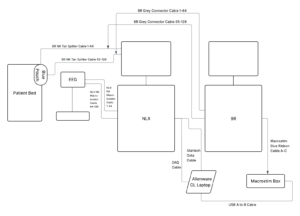
The Neuralynx system is the primary recording device, with the acquisition and stimulation being viewed on Pegasus. The NK cables originating from the neuralynx headboxes connect to the EEG monitor per the typical set up. If the Neuralynx has already been set up as the recording device for this patient, then during the set up, the clinical cables which connect the patient’s T-Bar (blue pouch) to the NLX headboxes should be removed as the Blackrock cables will take its place.
Blackrock: #
The blackrock systems primary purpose is to send the stimulation signal from the Macrostim box via Central. In order to connect the Blackrock to the neuralynx, the Blackrock NK cables will connect the NLX headboxes to the patients blue pouch, and the grey connectors will serve as Blackrocks connection to the set up. If Blackrock has already been set up as the recording device for this patient, then the blue pouch should already be connected via the Blackrock cables. In this case, the other end of the Blackrock NK cables will be disconnected from the EEG monitor and plugged into the NLX headboxes. While connecting the Blackrock cables to the patient’s T-Bar, ensure that the correct cable is connected to each box (A to A, B to B).
When the Blackrock Grey Connector Bricks are not in use, do not leave them dangling. Place them on the cart.
Stimulation: #
In order to determine which AD channel should be used for the Closed loop software and which Blackrock macro splitter bank should be connected to the Macrostimulator, we can use the Closed Loop Codex, found on the NAS Server. It serves as an easy way to understand how the AD channels correspond to the clinical montage, and which Neuralynx/Blackrock channels we should see the stim signals on. In order to use it, you must have access to the Clinical Montage. In the case it is not available, the EEG technicians in the Telemetry room should have it.
In order to take the impedances of the Macros, we can use the monitors in the Telemetry room. After locating the correct screen for the patient, there is an omega symbol in the tool bar near the top. Holding it will take the impedances of each Macro contact. Record this in the Blue Book on the impedances section.
Connect the Blue ribbon cable from the appropriate splitter bank to the matching bank on the Macrostimulator only when you are ready to stimulate under Neurologist Supervision. If Dr. Eliashiv is in, she will observe a test stim on Pegasus, and if she is out, she is open to FaceTiming someone in the room and observing over the phone. After Dr. Eliashiv approves the stim, we can start the session and continue without her.